
 Buy Windows Products
  Buy Mac Products
 Looking for an FLV Player?
FLV is an incredible file format that's designed to make sure that you, the happy viewer, can play files on various media without the hassle of converting. Looking for a powerful FLV player for Windows to view all of your favorite downloaded files?
VLC Player is our go-to platform for watching and enjoying media saved to any type of file! A free, open source multimedia player, you can view just about any file type saved to your computer - even DVDs, CDs, and more. You can get the latest version of the FREE VLC Player by first entering your email below:
Replay Capture Suite: 7 Download, Capture and Conversion Tools for One Great Price

Discover the Power to Capture ANY Online Video & Audio
The Replay Capture Suite contains seven incredibly handy software programs that provide all the tools you need to capture media from the internet. You can record radio, save music as MP3 files, download video, and convert and edit your recorded files. Explore the tabs above to see what the Replay Capture Suite can do for you!
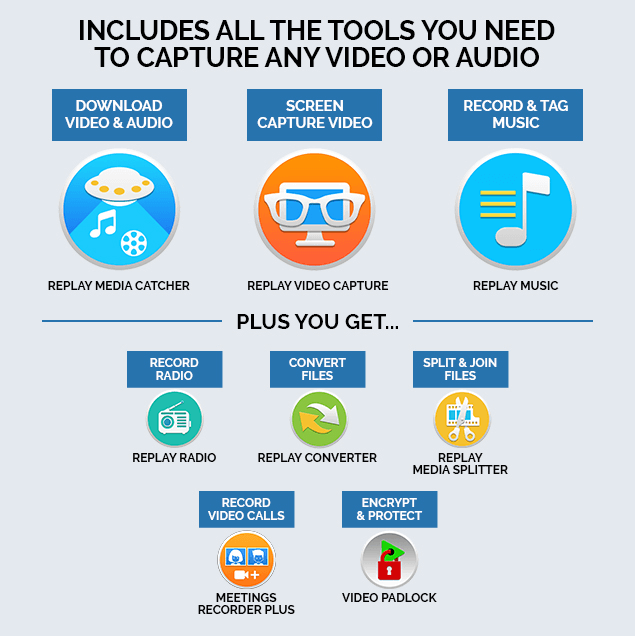
You save BIG when you order as a bundle, but you can also buy titles individually. If you already own one of the included
products, you can upgrade to the Replay Capture Suite for an even better price.
- Capture All Kinds of Streaming Video & Audio.
- Save Streaming Video, Radio Shows, Music, and More.
- Convert Recorded Files to 36 Popular Formats.
- Edit Audio and Video Files Easily.
- Encrypt personal video files on your PC.
- Includes a one-year subscription to the new Replay Radio!
- Free demos of each individual product.
Replay Media Catcher
Capture Premium Video and Audio with the world's best Streaming Video and MP3 Recorder. Replay Media Catcher is the only software that lets you capture streaming Video and Audio from previously unrecordable streams. Replay Media Catcher is the Ultimate Streaming Video and MP3 Capture Tool.
- Record all kinds of Streaming Videos.
- Huge built in Media Guide to help you find the videos, movies and music you want.
- Capture streaming MP3 files.
- Automatically names songs and video files.
- One click recording.
- Built-in file converter.
- Records streams from more sites than any other stream-capture solution

Replay Video Capture
Having trouble downloading some streaming web videos? Replay Video Capture can make high quality movies directly from your PC's screen. It is the best way to make production quality videos from hard-to-record sources, including:
- ANY Video Web Site, using ANY streaming protocol
- DVD's
- Webcam sites
- PowerPoint Presentations
- Skype Video calls
- Video Chat sessions
- And more!
Replay Music
Record MP3s or CDs from Online Radio Stations or Digital Music Services. Replay Music is the only package that can split songs perfectly into individual tracks, and then automatically add artist, title, album and genre information to MP3 files. It works like magic!
Replay Music is a unique streaming music recorder that captures MP3 files from any streaming audio source. Every song is saved on your PC as a high quality MP3 file,automatically tagged with the artist, song title, album and genre, and perfectly separated into individual tracks. You can even burn songs directly to CDs, or copy them to your iPod or MP3 Player. Plus, it's incredibly easy to use. What a great way to discover new music!
Replay Radio
Replay Radio is back and all new! Replay Radio is the best way to enjoy your favorite radio shows and stations. Just pick a show or station from the built-in guide, and Replay Radio schedules and automatically records the show for you. Then listen on-demand from your phone, tablet or PC.
Your purchase of the Replay Capture Suite includes a one year subscription to Replay Radio.
Replay Converter
Replay Converter is the easiest way to convert video and audio files. You simply pick the files to convert, choose an output format, and click a button to start the process. Everything happens automatically.
Replay Converter uses top-of-the-line codecs, to ensure the highest quality output. Replay Converter is especially good for these tasks:
- Converting Flash Video (FLV) files from YouTube, and other sites.
- Creating mobile device-friendly Video and Audio files.
- Creating MP3 files from Videos.
Meeting Recorder Plus
Meeting Recorder Plus is the only video and audio recorder for all types of video conferencing software including Zoom, Skype, and Google Meet. It offers the highest recording quality and makes it easy to record your calls in just one click. Meeting Recorder Plus is the perfect application for recording business meetings, family get-togethers or webinars
- Record Zoom, Skype and Google Meet calls in one click
- Top quality audio and video recordings
- Get your recorder file instantly - no waiting for slow connections
"I have been using Applian products for a long time and I am extremely happy with all of them. If any one needs great video software at a very reasonable price I would strongly recommend Applian Products!!! "
Pramod W. Freehold, NJ Read More Customer Reviews
Go Get It!
Try The Replay Capture Suite FREE. The free demo is fully functional so that you can try all of the features. You can capture 100% length of all YouTube videos with Replay Media Catcher, and shorter lengths of everything else.
Ready to Buy? The Replay Capture Suite comes with a no-questions asked 30-day money back guarantee.